
 Sahil K
Protecting the Right Data While Empowering the Right Users
Every organization wants employees to access the information they need while ensuring sensitive data remains protected. Salesforce achieves this balance through a powerful security model built around Profiles, Roles, and Permission Sets.
These three components work together to ensure that users have the right level of access based on their responsibilities.
Why Data Security Matters in Salesforce
Salesforce stores valuable business information such as:
- Customer Data
- Sales Opportunities
- Contracts and Quotes
- Support Cases
- Revenue Information
If the wrong users gain access to sensitive data, organizations may face security risks, compliance issues, and loss of customer trust.
A strong security model helps businesses protect data while maintaining productivity.
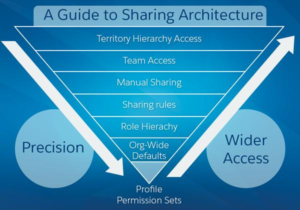
Understanding the Salesforce Security Model
Salesforce security operates at multiple levels:
Organization Level
Controls login access through IP restrictions and login hours.
Object Level
Determines which objects users can access.
Field Level
Controls visibility and edit access for specific fields.
Record Level
Determines which records users can view or modify.
Profiles, Roles, and Permission Sets work together across these layers to create a secure environment.
Profiles: The Foundation of User Access
Every Salesforce user must have one Profile.
Profiles define what a user can do within Salesforce, including:
✔ Object Permissions (Create, Read, Edit, Delete)
✔ Field-Level Security
✔ App and Tab Access
✔ Login Hours and IP Restrictions
For example, a Sales Representative may create and edit Opportunities, while a Support Agent can manage Cases but cannot access Sales Forecasts.
Profiles establish the baseline permissions assigned to every user.
Roles: Controlling Record Visibility
While Profiles determine what users can do, Roles determine which records they can see.
Roles are organized in a hierarchy.
Example:
CEO
↓
VP Sales
↓
Sales Manager
↓
Sales Representative
In this structure, managers gain visibility into records owned by their teams, while individual users primarily access their own records.
This improves reporting and management oversight without granting unnecessary permissions.
Permission Sets: Flexible Access Management
Organizations often need to provide extra access to a small group of users.
Instead of creating multiple Profiles, administrators can use Permission Sets.
For example:
Base Profile
- Read Leads
- Create Opportunities
Permission Set
- Manage Quotes
- Access CPQ Objects
Permission Sets provide additional permissions without changing a user’s Profile, making security easier to manage and scale.
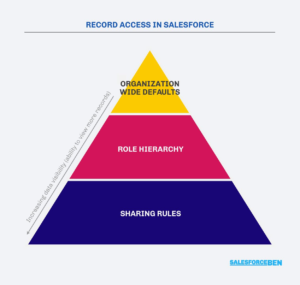
Benefits of Profiles, Roles & Permission Sets
Protect Sensitive Information
Field-Level Security and Profiles help restrict access to confidential business data.
Support Organizational Hierarchies
Role Hierarchies provide visibility to managers while maintaining record ownership.
Reduce Administrative Complexity
Permission Sets eliminate the need for numerous Profiles.
Improve Compliance
Structured access controls support regulations such as GDPR, HIPAA, and SOC 2.
Enable Business Growth
Permission Sets allow organizations to grant new access quickly without redesigning security models.
Best Practices for Salesforce Security
- Follow the Principle of Least Privilege.
- Use Permission Sets instead of creating excessive Profiles.
- Review user access regularly.
- Restrict sensitive fields using Field-Level Security.
- Document Profiles, Roles, Permission Sets, and Sharing Rules.
These practices help maintain a secure and scalable Salesforce environment.
Common Mistakes to Avoid
❌ Creating too many Profiles
❌ Granting System Administrator access unnecessarily
❌ Ignoring Field-Level Security
❌ Using Roles instead of Permission Sets for special permissions
❌ Failing to review access when employees change roles
Avoiding these mistakes reduces security risks and simplifies administration.
Conclusion
Salesforce Data Security is about providing the right access to the right users while protecting critical business information.
Profiles define what users can do.
Roles define which records users can see.
Permission Sets provide additional access when needed.
Together, these components create a secure, scalable, and well-governed Salesforce environment that supports both business growth and data protection.
“The best security model is one that users barely notice—but the business can always trust.”